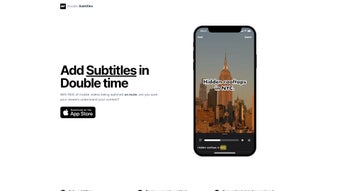

Download Double Subtitles – AI‑Powered Subtitle Generator for Mobile Creators
Overview
Double Subtitles is a cloud‑based, AI‑driven subtitle creation tool built specifically for the fast‑paced world of mobile video production. In an era where more than 80 % of social‑media videos are watched on mute, clear and accurately timed captions are no longer a luxury—they’re a necessity. Double Subtitles tackles this demand by delivering automated subtitles that boast a 90 % accuracy rate while operating up to 20 times faster than traditional manual methods. The platform’s web‑first architecture means you never need to install heavyweight software; simply log in from any browser and start processing your clips.
The service goes beyond raw transcription. It offers a suite of branding‑friendly customization options, letting creators select from a palette of fonts, colors, and layout styles that match their visual identity. Whether you prefer per‑word timing for a kinetic reading experience or per‑sentence blocks for a cleaner look, Double Subtitles adapts to your workflow. The AI engine also intelligently detects speech nuances, background noise, and overlapping dialogue, reducing the need for post‑generation edits. This combination of speed, precision, and aesthetic flexibility makes Double Subtitles a compelling ally for influencers, marketers, and small production teams looking to maximize engagement without sacrificing quality.
Key Features & Capabilities
- AI‑Powered Transcription: Utilizes deep‑learning models trained on diverse audio datasets to achieve up to 90 % accuracy across multiple languages.
- 20× Speed Advantage: Generates subtitles in seconds, dramatically cutting down turnaround time compared to manual captioning.
- Brand‑Centric Styling: Choose from dozens of fonts, colors, and background opacity settings to align subtitles with your visual brand.
- Per‑Word & Per‑Sentence Splits: Flexibly toggle between granular word‑by‑word timing or smoother sentence‑level captions.
- Multi‑Platform Export: Export subtitles in SRT, VTT, or embedded MP4 formats ready for Instagram, TikTok, YouTube, and more.
- Noise‑Reduction Filters: AI automatically filters out background chatter, ensuring spoken words are captured cleanly.
- Batch Processing: Upload multiple videos at once and let the system handle them in parallel queues.
- Cloud‑Based Storage: All projects are saved securely in the cloud, allowing you to access and edit them from any device.
Beyond the headline features, Double Subtitles integrates seamlessly with popular video editing suites via simple import/export workflows. The platform also supports collaborative editing, so teams can assign subtitle review tasks, leave comments, and approve final versions within the same interface. For creators who need to localize content, the tool includes a built‑in translation module that can generate subtitles in over 30 languages, further extending audience reach without the need for third‑party services.
Installation, Setup & Compatibility
Because Double Subtitles is delivered as a web application, there is no traditional “installation” process. Users simply visit doublesubtitles.com, create a free account, and begin uploading videos. The sign‑up flow is straightforward: provide an email address, verify it through a quick confirmation link, and you’ll be ready to explore the dashboard.
Step‑by‑Step Usage Guide
- Upload Your Video: Drag and drop your file (MP4, MOV, or AVI) into the upload area or select it from your device. The platform supports files up to 2 GB for free users.
- Select Language & Accuracy Mode: Choose the spoken language and whether you want the standard 90 % accuracy or the premium 95 % mode (available with a paid plan).
- Configure Subtitle Style: Pick your preferred font, color, and timing mode (per‑word or per‑sentence). Preview changes in real time on a sample segment.
- Generate Subtitles: Click “Start” and let the AI engine process the audio. You’ll receive a progress bar and an estimated completion time.
- Review & Edit: Once generated, review the captions directly in the web editor. Minor adjustments can be made with a click, and the system highlights low‑confidence sections for quick correction.
- Export & Publish: Download the subtitle file in your desired format or export the video with embedded captions ready for upload to social platforms.
Compatibility is universal because the service runs in any modern browser (Chrome, Firefox, Safari, Edge) on Windows, macOS, Linux, Android, and iOS devices. For creators on the go, Double Subtitles also offers a lightweight mobile‑optimized interface, allowing you to generate and edit subtitles from a smartphone or tablet without losing any functionality.
Security is a priority: all uploads are encrypted in transit using TLS 1.3, and stored files are protected with AES‑256 encryption. The platform complies with GDPR and CCPA standards, giving you confidence that your content and data remain private.
Pros, Cons & Frequently Asked Questions
Pros
- Lightning‑fast subtitle generation (up to 20× faster than manual methods).
- High accuracy (90 %+), with premium models for even greater precision.
- Extensive branding options for fonts, colors, and layout.
- Fully web‑based – no downloads, works on any device.
- Batch processing and cloud storage streamline large projects.
- Built‑in translation for multilingual audiences.
Cons
- Free tier limits file size to 2 GB and caps monthly subtitle minutes.
- Advanced accuracy mode and bulk export require a paid subscription.
- AI may occasionally misinterpret heavily accented speech without manual review.
FAQ
How accurate are the subtitles generated by Double Subtitles?
The standard AI model delivers around 90 % accuracy across major languages. Premium users can access a higher‑precision model that reaches approximately 95 % accuracy, especially useful for technical or industry‑specific terminology.
Can I use Double Subtitles for languages other than English?
Yes. The platform supports over 30 languages, including Spanish, French, German, Mandarin, Hindi, and many more. Language selection is made during the upload step, and the AI automatically applies the appropriate model.
Is there a desktop app for offline use?
Currently Double Subtitles is offered as a cloud‑only service. This design ensures you always have the latest AI improvements and eliminates the need for local processing power, which is especially beneficial for mobile creators.
What export formats are supported?
Export options include standard subtitle files such as SRT and VTT, as well as embedded MP4 files with hard‑coded captions. You can also download a JSON file containing timing data for custom integrations.
How does Double Subtitles handle data privacy?
All uploads are encrypted using TLS 1.3 during transmission and stored with AES‑256 encryption. The service adheres to GDPR and CCPA regulations, and you can delete any project permanently from your dashboard at any time.
Review Summary: Double Subtitles delivers a compelling mix of speed, accuracy, and brand‑centric customization that makes it an essential tool for mobile video creators. While the free tier has modest limits, the value proposition of the paid plans justifies the cost for serious influencers and small agencies.
Conclusion & Call to Action
In a landscape where audience attention spans are shrinking and silent viewing is the norm, Double Subtitles equips creators with the technology they need to keep messages clear and engaging. The AI engine’s rapid turnaround, combined with a robust set of styling options, means you can produce professional‑grade captions without the usual bottlenecks of manual transcription. Whether you’re posting short TikTok clips or longer YouTube tutorials, the platform scales to meet the demand.
Ready to elevate your video content and boost accessibility? Sign up for a free account today and experience the speed of AI‑driven subtitling. For creators who need unlimited minutes, premium accuracy, and priority support, explore the subscription plans that fit any budget. Don’t let muted videos limit your reach—download Double Subtitles now and let every word count.



.png)



